FREE ON THE MAC APP STORE · 100% OFFLINE
Every file has a story.
Read it in raw bytes.
HexLume is a forensic-grade, read-only hex viewer and interactive binary classroom for macOS. Mount gigabyte-scale files instantly, expose hidden metadata, verify magic-byte signatures, and watch cryptographic fingerprints react in real time — without ever touching a single byte on disk.
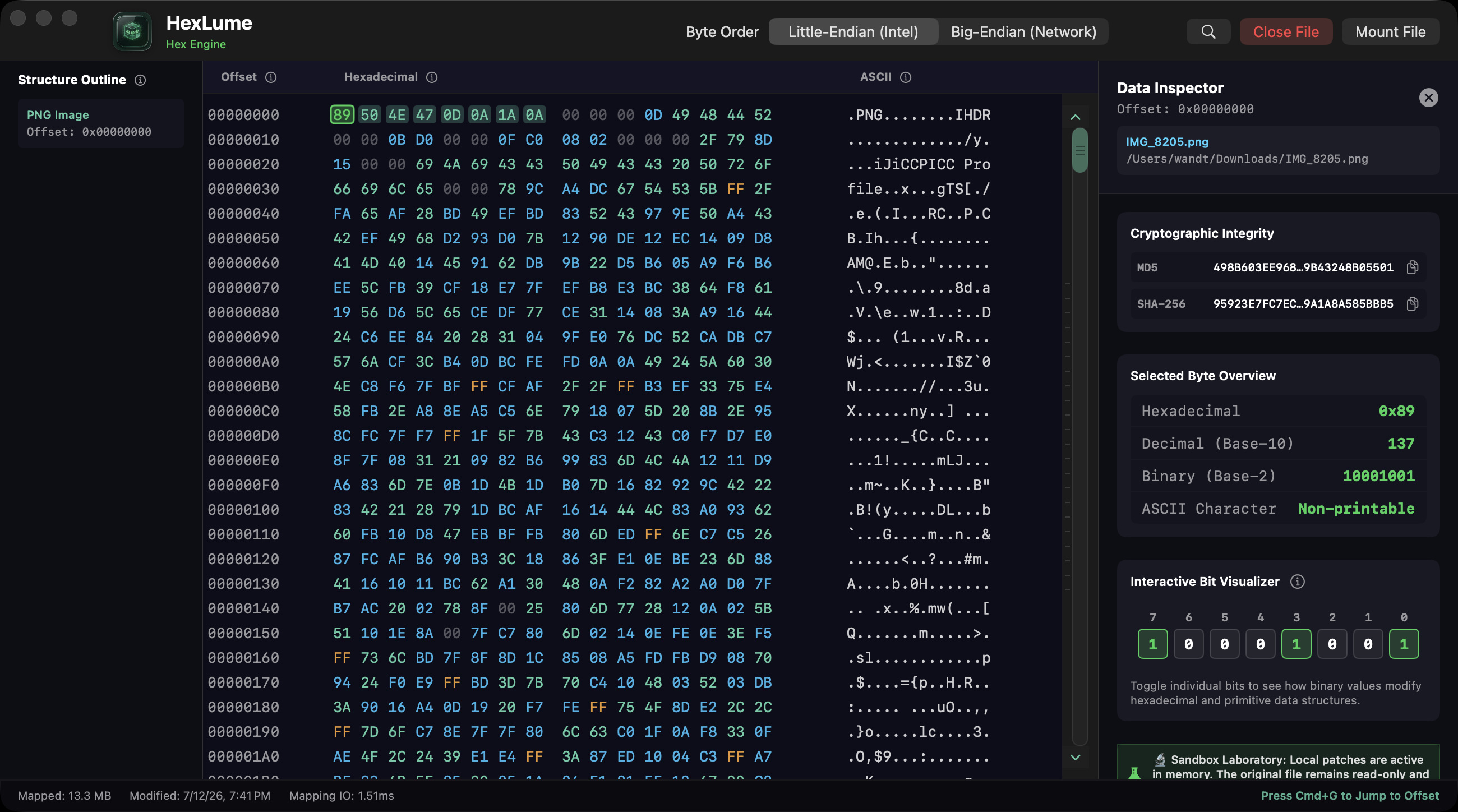
mmap()
Memory-mapped engine — TB-scale files open instantly
<15 MB
RAM footprint, even on multi-gigabyte disk images
SHA-256
Live cryptographic fingerprints on every mount
Read-only
Physically incapable of writing — evidence stays pristine
Interactive Simulation
Don't take our word for it.
Don't take our word for it.
Flip a bit right here.
This is a live, in-browser miniature of HexLume's engine — a real 64-byte PNG header you can dissect. Click any byte, toggle its bits, switch endianness, and watch the SHA-256 fingerprint shatter. Everything below runs locally on this page, exactly like the app runs locally on your Mac.
Checking signature…
| Offset | Hexadecimal | ASCII |
|---|
magic bytes
printable ASCII
null padding
mutated in sandbox
← swipe the grid →
Selected Byte 0x00
Hexadecimal0x89
Decimal137
Binary10001001
ASCII·
Interactive Bit Flipper
Toggle bits in memory — the sandbox mutates a copy; the “disk” original stays untouched, just like HexLume.
Data Interpreter
Cryptographic Integrity
SHA-256 · On “disk”
—
SHA-256 · In memory MATCH
—
The Built-in Curriculum
A computer-science lab bench
A computer-science lab bench
disguised as a utility.
HexLume was engineered as an interactive sandbox for students, teachers, and security bootcamps. Four foundational concepts — normally taught on whiteboards — become things you can touch.
Metadata Forensics
MODULE 01
Mnemonic Heatmap & EXIF Structures
Every photo, PDF, and document quietly carries hidden metadata telemetry — camera models, GPS traces, color profiles, editing history. HexLume's mnemonic heatmap tints each byte by class (printable text, null padding, high-entropy data), so embedded EXIF blocks and ICC profiles visually pop out of the noise. Students learn to spot what everyday files reveal about their authors — and where it physically lives on disk.
Computer Architecture
MODULE 02
Binary & Endianness Interpreter
Tap any byte to decompose it into Int8/16/32/64, Float, and Double — simultaneously in Little-Endian (Intel/ARM) and Big-Endian (Network) byte order. Then open the Bit Flipper and toggle individual bits virtually, in memory: students watch ones and zeros ripple into hex characters and signed, unsigned, and floating-point values in real time. Endianness stops being a lecture slide and becomes muscle memory.
Security Analysis
MODULE 03
Magic-Byte Header Analysis
File extensions are a polite suggestion — headers are the truth. HexLume scans raw hex signatures at block boundaries the way real security tooling does, instantly flagging a “.jpg” that is secretly an ELF executable or a ZIP archive. Students learn signature-based verification: the exact technique analysts use to catch masquerading malware and spoofed uploads.
Applied Cryptography
MODULE 04
Cryptographic Integrity & SHA-256
Every mounted file gets a live MD5 and SHA-256 fingerprint. Flip one bit — change one pixel, strip one metadata tag — and the entire digest transforms beyond recognition. This is the avalanche effect, the property underpinning evidence integrity, code signing, and blockchain — demonstrated in one click instead of one semester.
Under the Hood
Forensic-grade internals.
Forensic-grade internals.
Classroom-grade clarity.
Memory-Mapped Engine
Gigabytes open before your finger leaves the trackpad.
HexLume never “loads” files — it memory-maps them with mmap(). Raw disk images, binary payloads, and partition offsets appear instantly, and scrubbing through terabytes feels like scrolling a text file.
- Instant mounts — no import step, no progress bars, no temp copies
- <15 MB of RAM even while viewing multi-gigabyte forensic images
- Native Apple-silicon macOS app, built exclusively for the Mac
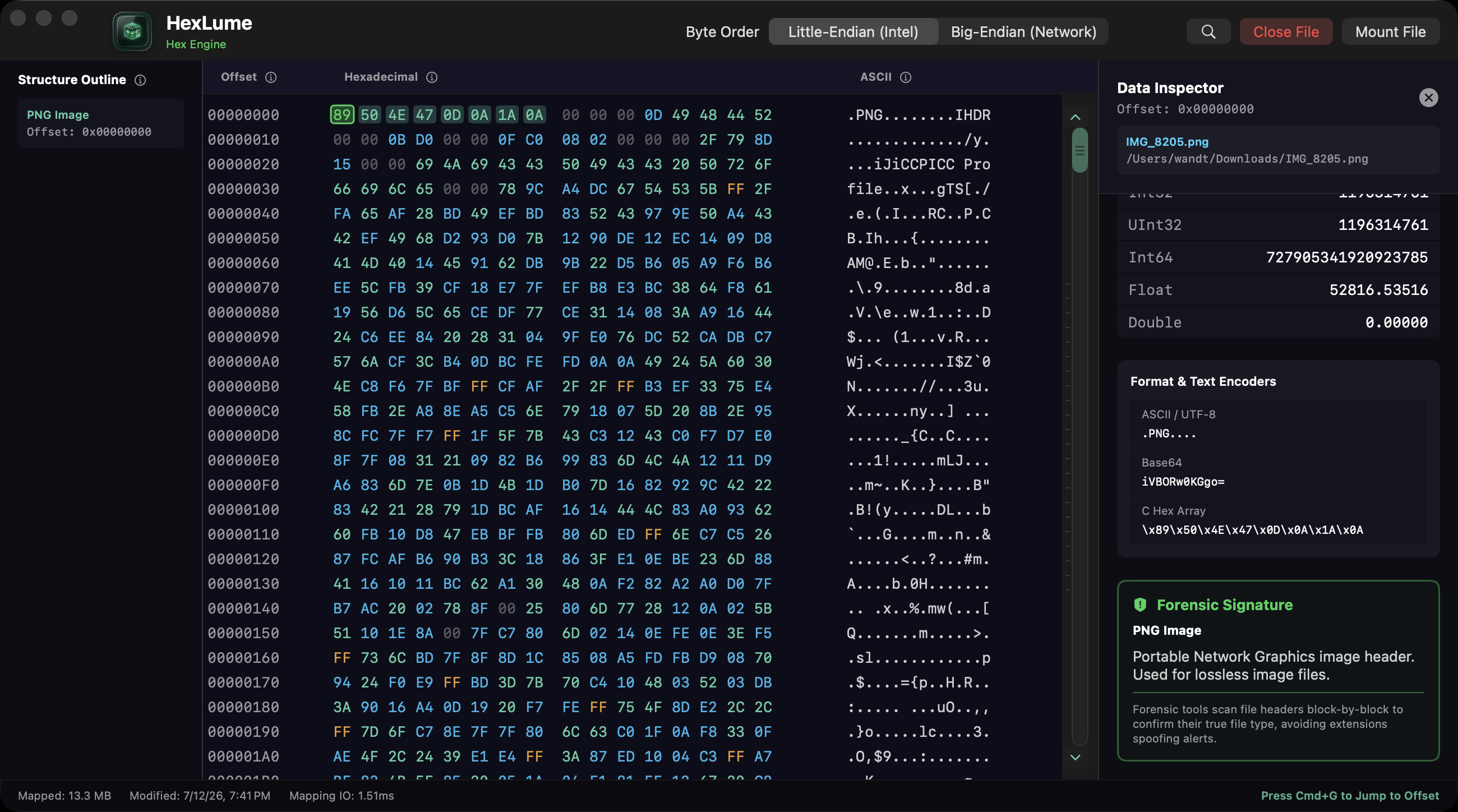
Signature Scanner
Extensions lie. Headers don't.
The Forensic Signature scanner reads raw magic-byte headers at block boundaries and identifies the true format — catching executables masquerading as images and archives hiding behind innocent extensions.
- Masquerade detection — flags mismatches between extension and signature
- Format & text encoders — ASCII/UTF-8, Base64, and C hex-array views of any selection
- Plain-language explanations of each detected header, built for teaching
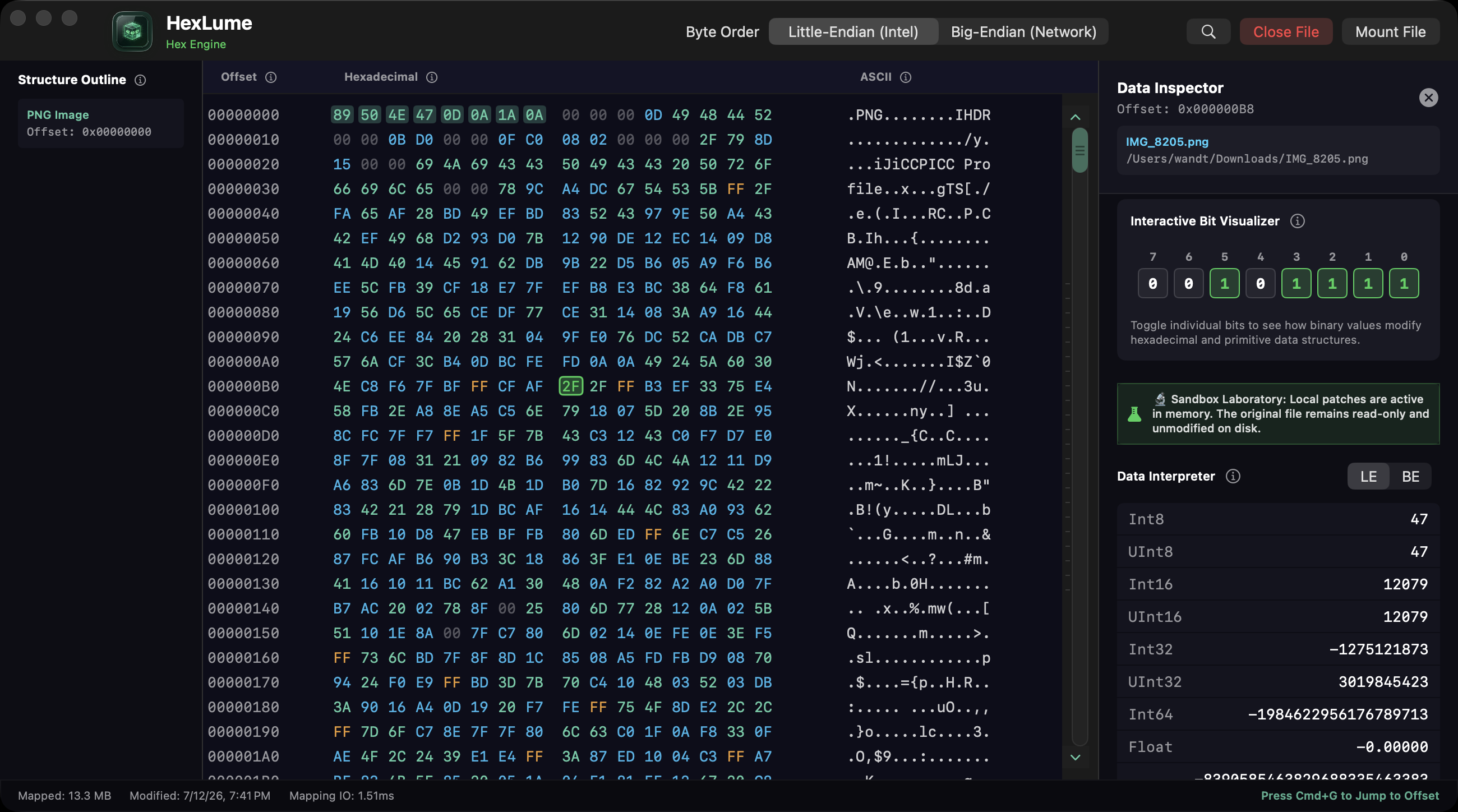
Bit Flipper & Data Interpreter
A particle accelerator for a single byte.
Select any offset and HexLume decomposes it into every primitive representation at once. The Interactive Bit Visualizer lets students toggle bits virtually in memory — the Sandbox Laboratory keeps the original file read-only and unmodified on disk.
- Int8 → Int64, Float & Double decoded live at the cursor
- LE ⇄ BE toggle — see Intel vs. Network byte order side by side
- Zero-risk mutations — all patches live in memory, never on disk
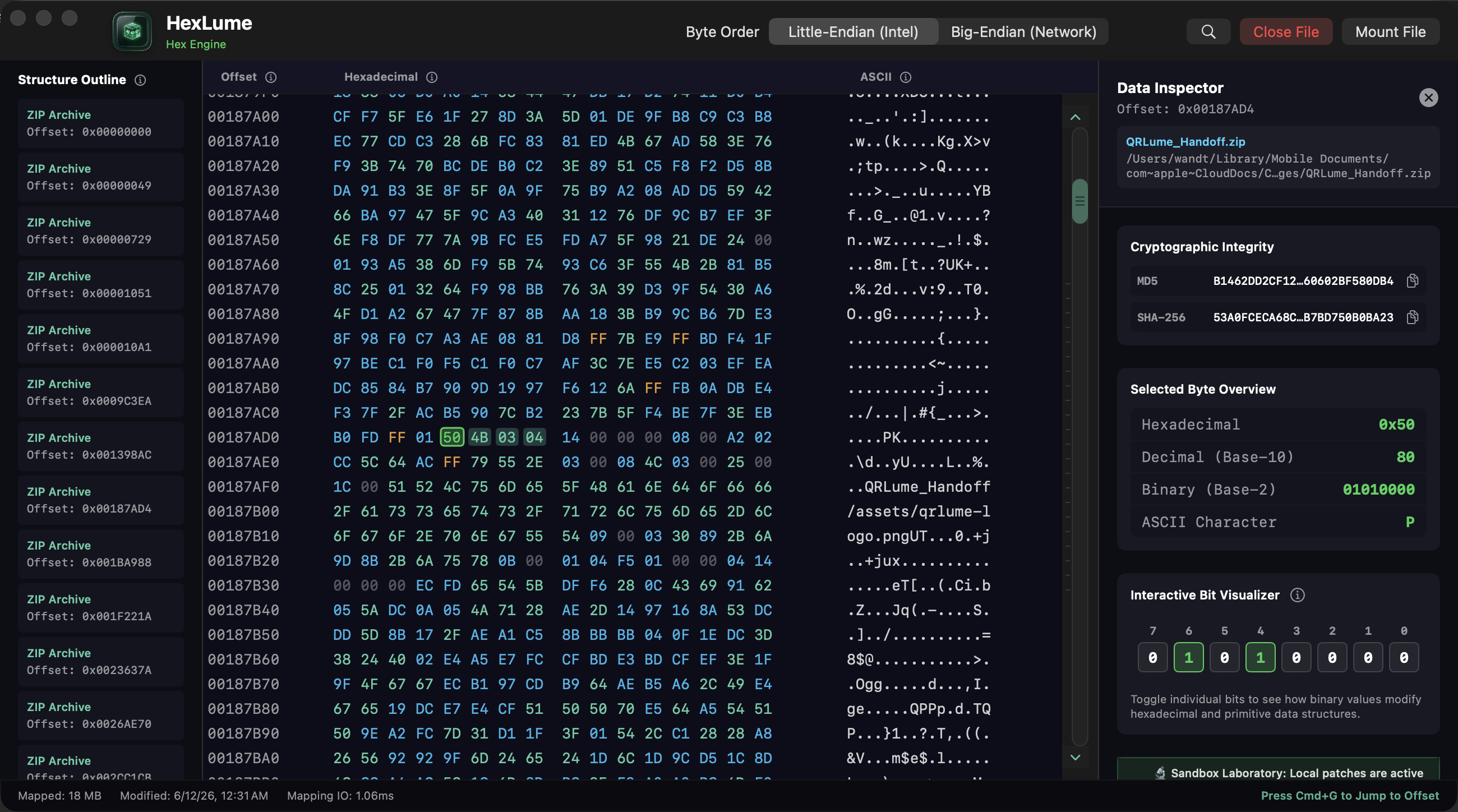
Structure Outline
Carve structure out of chaos.
The Structure Outline scanner walks the entire mapping and pins every embedded structure it finds — ZIP directory entries, image headers, nested archives — into a clickable sidebar. One click warps you to the exact offset.
- Block-by-block carving across the whole file, not just offset zero
- Jump-to-offset navigation (⌘G) for surgical inspection
- Live IO stats — mapped size and mapping latency in the status bar
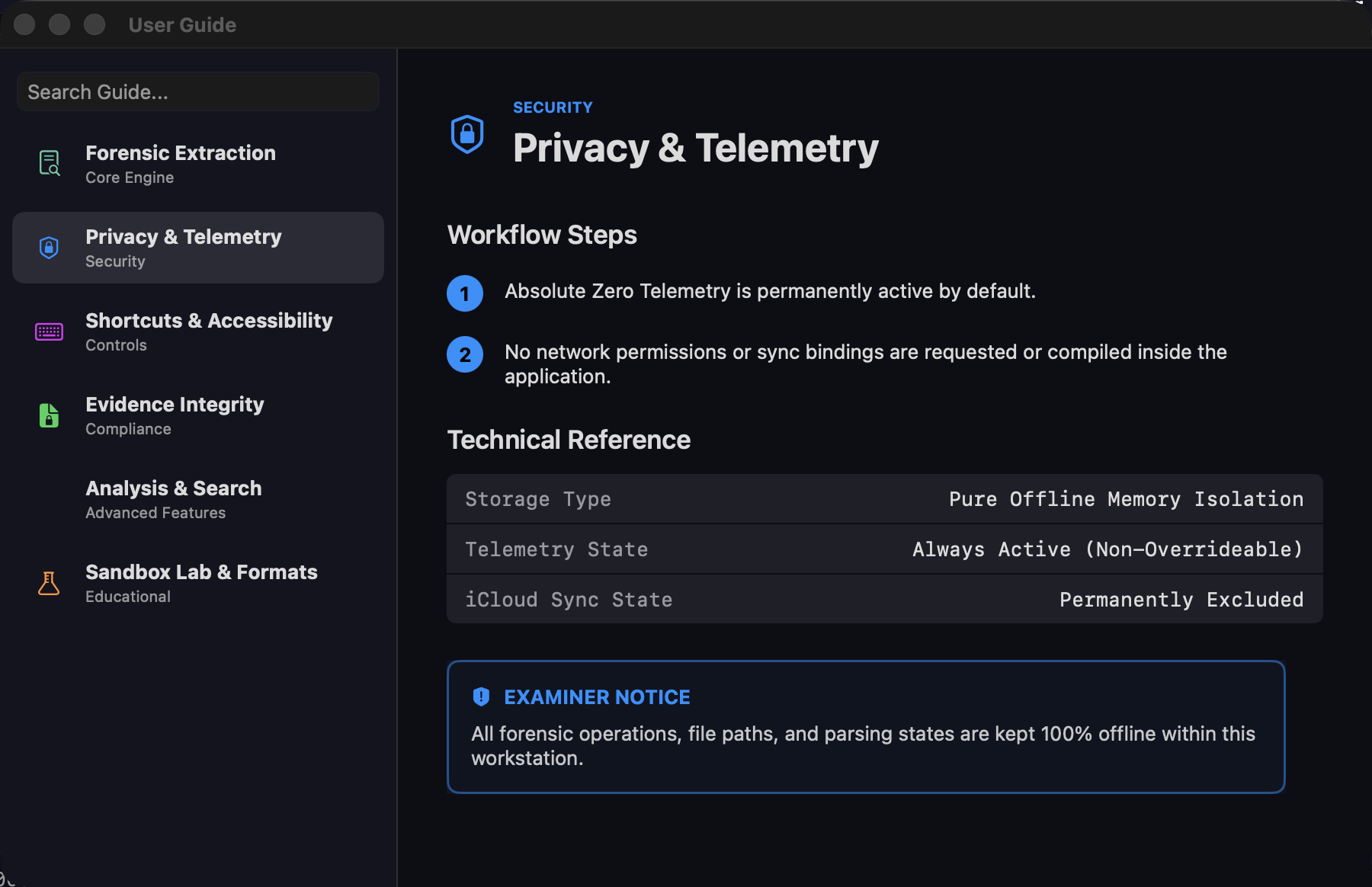
Built-in Reference Manual
The textbook ships inside the app.
A full User Guide lives one keystroke away — chapters on forensic extraction, evidence integrity, the sandbox lab, and file-format anatomy. Perfect for flipped classrooms and self-paced labs: students explore, the manual explains.
- Searchable chapters spanning core engine to compliance topics
- Educational Sandbox Lab & Formats section written for beginners
- Shortcuts & accessibility reference for efficient teaching demos
Need to edit bytes, not just read them? Our pro editor HexWrite patches hex, repairs headers, and runs XOR / fill range operations.
See HexWrite Pro
Who It's For
From first hex dump
From first hex dump
to chain of custody.
Students
Finally see what CS lectures describe — two's complement, IEEE floats, byte order, and file anatomy, live on real files you already own.
Teachers & Professors
A zero-cost, zero-setup demo bench for systems and security courses. Project it, flip a bit, and watch the room understand endianness in one minute.
Security Bootcamps
Teach signature-based verification, metadata exposure, and hash integrity with the same workflow analysts use — minus the enterprise tooling price tag.
DFIR Professionals
A fast, write-blocked second opinion. Mount an image, verify hashes, check headers — with a tool that physically cannot alter evidence.
Fully Localized
One app.
One app.
Fifteen languages.
Every panel, lesson, alert, and User Guide chapter ships fully localized — the same 15-language catalog as our App Store listing. Arabic and Hebrew include complete right-to-left document orientation. This website speaks all fifteen too — try the selector in the top bar.
- EnglishEN
- DeutschDE
- EspañolES
- FrançaisFR
- ItalianoIT
- Português (Brasil)PT-BR
- 日本語JA
- 한국어KO
- 简体中文ZH-HANS
- 繁體中文ZH-HANT
- العربيةARRTL
- עבריתHERTL
- РусскийRU
- हिन्दीHI
- TürkçeTR
Zero Telemetry · Absolute Write-Block
It can't phone home.
It can't phone home.
It can't even save.
HexLume physically lacks write and save routines — the binary contains no code path that mutates your files, preserving original cryptographic hashes and the chain of custody. And with no network permissions compiled into the app, every operation stays on your Mac. Not “anonymized.” Not “opt-out.” Absent.
- Write / save routines Not compiled in
- Network calls & diagnostics Zero
- Telemetry state Off — non-overrideable
- iCloud sync of case data Permanently excluded
- Execution 100% offline
Sister App · When Reading Isn't Enough
Need to patch bytes or repair headers?
Need to patch bytes or repair headers?
Upgrade to HexWrite.
HexLume teaches you to read binary. HexWrite lets you rewrite it — an active, forensic-grade binary patcher for developers, reverse engineers, and malware analysts who need to edit compiled targets, run range operations, and repair damaged file headers.
- Active Byte Patching — mutate hex in an in-memory write buffer; modified cells light up with a pulsing red dirty-state warning before anything touches disk.
- Header Repair Assistant — detects spoofed extensions and corrupted signatures, then injects conforming magic bytes at offset 0x0 to resurrect broken files in one click.
- Block Range Operations — fill spans with NOP sleds or nulls, bitwise-NOT whole sections, or apply XOR key sequences to unpack and obfuscate code.
- Pre- & Post-Write Integrity Hashes — background MD5/SHA-256 digests captured before edits and after saves, proving exact cryptographic changes for audit trails.
$9.99 / year · or a $39.99 lifetime license — one-time payment, yours forever
| Feature | HexLume · Free Viewer | HexWrite · Pro Editor |
|---|---|---|
| Execution mode | STRICT READ-ONLY | ACTIVE WRITE-ENABLED |
| mmap engine | Dynamic block loading | In-memory patch buffer mapping |
| Bit-level visualizer | Interactive sandbox (read-only) | Active bit-level patcher (write buffer) |
| Forensic signatures | Magic-byte outline scanner | Header Repair Assistant — one-click repair |
| Block range operations | Selection exports only | XOR keys, fill range (NOP sleds), bitwise NOT |
| Data interpreter | Intel/Network endianness decoder | Active byte encoder — ASCII, Base64, C hex array |
| Cryptographic hashing | Real-time SHA-256 / MD5 check | Comparative pre- & post-write integrity hashes |
| Unsaved edits HUD | N/A — write disabled | Dirty-state indicator highlights modified cells in red |
| Search engine | Pattern offset finder | Pattern find & replace — strings or hex arrays |
| Cost | 100% FREE | $9.99/YR · $39.99 LIFETIME |
← swipe the grid →
Start free with HexLume — when you're ready to write, HexWrite is waiting.
FAQ
Quick answers.
Is HexLume really free?
Yes — HexLume is a 100% free standalone utility on the Mac App Store. No subscriptions, no in-app purchases, no “pro” tier hiding the good parts.
Can HexLume damage or modify my files?
No. HexLume is strictly read-only by architecture — the app contains no write or save routines at all. Bit flips and patches happen in an in-memory sandbox copy; the file on disk (and its hashes) remain byte-for-byte identical. If you actually need to edit bytes, that's what our pro editor HexWrite is for.
I've never opened a hex editor. Is this for me?
Especially you. HexLume was designed as a learning sandbox first: guided explanations, a built-in user guide, plain-language signature descriptions, and an interactive bit visualizer that teaches binary, endianness, and hashing by doing. Try the lab on this page — if that was fun, you're ready.
What can professionals actually use it for?
Fast triage and verification: confirming file signatures, spotting extension masquerades, reading EXIF/metadata structures, verifying MD5/SHA-256 integrity, and scrubbing raw disk images at terabyte scale with a write-blocked, offline tool.
Does it send any data anywhere?
It can't. No network permissions are requested or compiled into the application. All forensic operations, file paths, and parsing state stay on your workstation, permanently excluded from iCloud sync.
What languages does HexLume speak?
Fifteen: English, German, Spanish, French, Italian, Brazilian Portuguese, Japanese, Korean, Simplified and Traditional Chinese, Arabic, Hebrew, Russian, Hindi, and Turkish — with full right-to-left support for Arabic and Hebrew. The complete in-app catalog, including every User Guide chapter, is localized.
What are the requirements?
A Mac. HexLume is built natively and exclusively for macOS and is distributed through the Mac App Store (bundle: com.profworkbench.HexLume).
Mount your first file
in the next 60 seconds.
Free forever. Offline forever. Read-only forever. The only thing HexLume changes is how you see files.